Wednesday, March 25, 2015

3 Tips For Wearable Entrepreneurs from Wearables TechCon

e wearable technology market is on the rise ($20 billion in 2015 to almost $70 billion in 2025), and as with every new technological advancement, there’s room for innovative entrepreneurs to jump on the bandwagon and create the next billion dollar venture. Just this month, wearable engineers, designers, developers, and enthusiasts gathered in Silicon Valley at Wearables TechCon 2015 to discuss current trends, what’s to come, and what’s possible in the wearable tech industry. Over three days of classes and keynotes, attendees learned how to architect apps for the Apple Watch, work with artificial intelligence on recognizing emotions, expand the capabilities of fitness technologies, what it takes to bring prototypes to market, and much more.
In speaking of bringing your wearable to the market, there are various barriers to entry when it comes to ensuring a successful product launch. While you can use 3D printers to produce a semi-functional prototype, securing the right technology, design, and materials can take years. Additionally, entrepreneurs not only have to consider what value their product provides but also the context where the wearable performs well (is it waterproof?), the form of the wearable (is it obtrusive?), how it functions (it is a touch-based? Does it blink? Chime?), and whether the market will adapt to the new process (is it safe to wear? Will it clash with my outfit?).
So, for our readers who are thinking about creating the next infamous wearable, we gathered three tips from Wearables TechCon 2015 speakers on current barriers to entry are and how to overcome them:

Tip 1: Focus on Your Niche

“Don’t go with the swiss-army knife go with chef knife – show the users how to do something really well.” – Dr. John Feland, CEO Argus Insights

When determining what your wearable provides, focus on the niche subject matter that you know your wearable will address well. Consumer adoption will initially depend on the quality of the prime offering the product provides – not how many bells and whistles it has.


Tip 2: Adjustments Are Inevitable
“There are many points of barriers. Though a crude prototype can be built relatively cheaply and quickly, every team will be challenged with turning a prototype into a polished manufactured product on a large scale. Expect numerous iterations.” – Scott Amyx, Founder & CEO of Amyx+McKinsey

Recognize that your initial concepts will adapt over time as consumer feedback leads to product updates, and new materials enable enhanced product form and functionality. When it comes to creating the next hit, you have to be open to adjusting your models. Take a look at Fitbit’s history to get an idea of the transformations possible.

Tip 3: Don’t Forget About Securing Your Patents

“Competition between players is increasing exponentially as new wearables enter the market. At the very minimum, entrepreneurs need to meet early on with their IP counsel to discuss filing for provisional patent protection and filing intent-to-use trademark and service mark applications in the United States and in other critical marketplaces around the world. Early filing is essential given the changes in the law under the America Invents Act.   Entrepreneurs should also take stock of the materials that they are creating (e.g.: Websites, brochures, manuals, videos, digital content) and file for copyright protection with the United States Copyright Office.” – Kenneth Suzan, Trademark, Copyright, Social Media Counsel at Barnes & Thornburg LLP and Host of IP Fridays

The wearable fitness tracking (FitBit, MisFit) and smartwatch (Apple Watch, Android Wear) worlds are already inundated with competitors, to ensure that your next innovation can make a move in the market, securing your IP documentation should be a priority.

Friday, March 13, 2015

8 Psychological Triggers to Optimize Your Pricing Page


Pricing pages have a huge impact on online sales. Designing the right pricing page is key to increasing checkouts and revenue, but there’s a lot more to a pricing page than its design.
Since emotions and psychological triggers influence purchasing behavior, and since consumers depend on products and services to fulfill emotional needs in their lives, pricing pages should meet those needs.
The way things are presented to people affects their decision-making. In this post, we’ll take a look at psychological triggers that influence purchasing behavior. We’ll also go over how to incorporate the triggers into pricing pages.

1. Decoy Effect

According to the decoy effect, consumers have a hard time making up their minds. So, when they are given two options, they tend to prefer the first option because it looks better, even though both options could be exactly the same.
People have a noticeable change in preference according to the way choices are presented. Sometimes, using a third option helps to guide them toward a specific choice. Considering the decoy effect, make sure you offer pricing plans that lead customers to purchase the plan you want them to purchase.
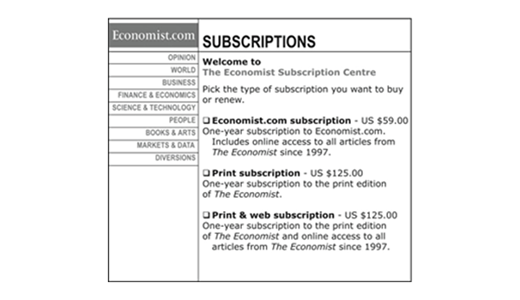
Let’s take a look at The Economist’s famous pricing page to better understand how to incorporate the decoy effect into your pricing page design. The first plan costs $59 for the online version only, the second plan costs $125 for the print version only, and the third plan costs $125 for both print and online versions.
According to the decoy effect, the first two options require thinking and considering, while the third option presents an easy decision: $125 for both versions is better than $125 for print only or $59 for online only.
1 sucscriptions notice

2. Anchoring Effect

Even though more accurate information may be presented later, people tend to rely on the first piece of information they receive. You see this everywhere, even at the supermarket where an old label will be placed above a new one or the unit price will be shown above the actual price. Showing an older, higher price gives consumers the sense that they are getting a deal.
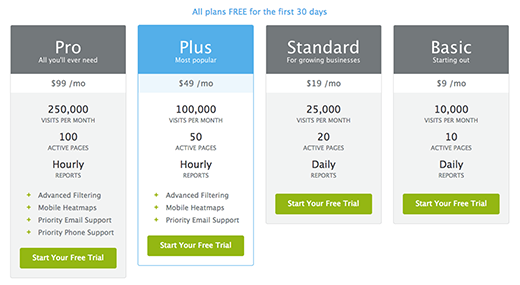
Crazy Egg does a good job of utilizing the anchor effect on their pricing page. Even though there are four price points, the most expensive price points are shown first. This makes the $49/month plan seem like a bargain next to the other monthly subscriptions. In addition, Crazy Egg highlights in blue the plan they prefer their customers purchase, so it stands out among the other plans in gray.
2 pricing plans page

3. Analysis Paralysis

While providing two or more options can be beneficial to satisfy consumer preference, you should be cautious about using too many options. Analysis paralysis happens when people overthink a situation to the extent that they never make a decision or take an action. In the context of pricing pages, offering too many options can cause consumers to overthink and leave the page.
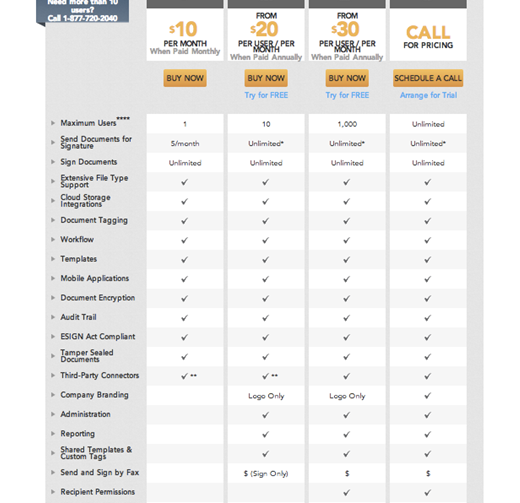
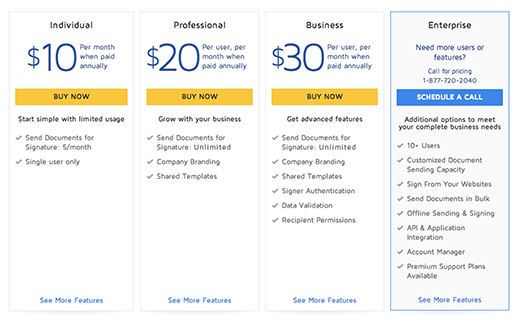
DocuSign’s pricing page used to have endless lists with checkmarks, along with five different price points, making it extremely difficult to figure out. The page has been simplified to summarize the core features that help users make a determination in selecting a package.
This is the “before” page:
3 super long pricing page
This is the “after” page:
4 enterprise pricing page
Although simplified and with fewer options, this pricing page still does a poor job of guiding people toward “the best” pricing, and it still has too many options and checkmarks to analyze.
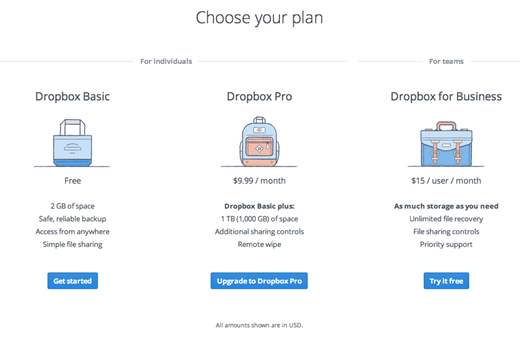
Dropbox, on the other hand, has three price plans that focus solely on their core feature – storage space. This makes it simple for users to differentiate and choose.
5 dropbox pricing page

4. Scarcity

The less there is of something the more valuable it is perceived to be. Take diamonds, for example. A small group of companies controls the quantity of diamonds in circulation in order to keep prices high. To use scarcity in your pricing pages, eliminate the possibility of future abundance in the minds of your customers.
Setting a time limit on pricing pages, an “invitation only” event, or a cap on the number of products is a great way to introduce scarcity into your pricing pages.
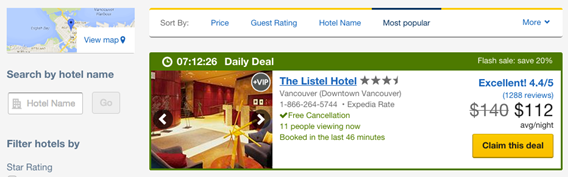
Expedia uses scarcity throughout their pricing pages. On the search results page, they display:
  • The number of people who recently viewed a property
  • The last time it was booked
  • The time left for the deal
This gives the perception that rooms are going fast and entices the user to book quickly before losing their chance.
6 daily deal

5. Loss Aversion

Our desire to avoid pain or loss is even stronger than our desire to pursue joy or gain. Some studies show that losses are twice as powerful psychologically as gains. This implies that a person who loses $100 suffers pain that is more intense than the joy the person experiences when he or she gains $100. There are a few ways to use this psychological trigger in your pricing page design:
  1. Free trials – The whole world of free trials is built on the basis of loss aversion. Once a person has been using a product for a while and has become dependent on it, paying for it is the next natural step in order to avoid the loss of the product.
  2. Messaging – You can focus a visitor’s attention on the loss they may suffer by not becoming a customer rather than on the gains they may achieve by becoming a customer.
  3. Timing – A limited time offer with an expiration date on it sets off the loss aversion trigger and converts visitors quicker.

6. Hyperbolic Discounting

Hyperbolic discounting is a psychological trigger that has to do with the way we evaluate rewards. When given a choice between two awards, we tend to prefer the one that arrives sooner even if it is worth less. In other words, people favor an instant reward and discount the one they have to wait for.
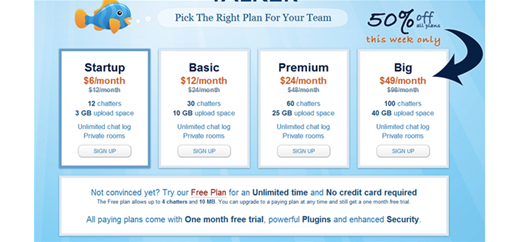
TalkerApp (before it became a free service) used to offer an immediate reward to customers choosing a specific pricing plan, convincing visitors to try the larger plan.
7 pricing page 50 percent
Dropbox attributes 35% of their daily signups to their referral program. By offering an immediate reward (free space) to their customers, Dropbox increases their referrals and increases their daily signups.

7. Choice Supportive

Choice supportive is another psychological trigger that affects our purchasing habits. It refers to our general tendency to attribute a positive perspective to our past decisions. Once we’ve made a decision, we tend to continuously convince ourselves of the great decision we made, which is why pricing pages are a great place to show testimonials. Showing others that people are happy, content, and satisfied is a great way to increase pricing page conversions.
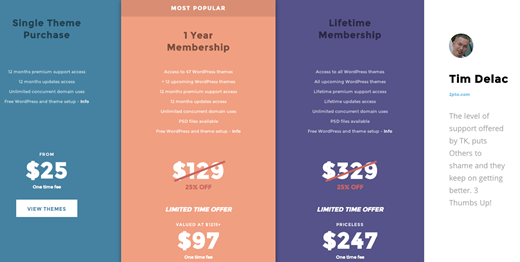
Note how TK uses a testimonial right on the side of their pricing page, confirming it is a trustable service, but more importantly, relaying that people are extremely satisfied and happy with their past decision to become a member.
8 tim delac

8. Trust

It all comes down to trust in the end. Customers need firm assurance that they can trust you before they turn over their credit card to your site, because that’s not an easy thing to do. There are many ways to convey trust:
  • Mention the number of people who’ve trusted you so far
  • Present trust icons
  • Display testimonials
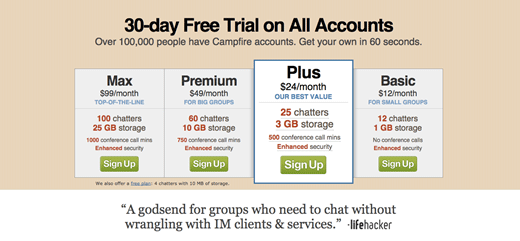
Campfire introduces two of the three methods, showing there are over 100,000 customers and adding a testimonial at the bottom of the pricing page.
9 30 day free trial
By understanding the psychological triggers that motivate all of us, you can build a stronger connection with your audience and influence your customers to take a desired action.
What other psychological triggers do you utilize in your pricing page design?
About the Author: Talia Wolf is the CEO and Founder of Conversioner. Talia helps businesses build their conversion optimization strategies and execute them to increase their revenues, grow their sales, leads and engagement using quantitative data, consumer psychology & emotional conversion optimization. Talia specializes in Ecommerce optimization, landing page optimization, mobile optimization and consumer psychology. Tweet her at @taliagw.

The Psychological Trigger That's Confusing Your Customers

For countless years, businesses have been searching for their own unique selling propositions, trying to differentiate themselves from their competitors and convince customers to choose them.
Businesses go about this in many ways, such as by highlighting the different features they have, lowering prices (or, in some cases, increasing prices), or focusing on the competitor’s disadvantages.
More progressive businesses focus on the emotional value their product or service provides. They emphasize how they change their customers’ lives, not by supplying them with endless pairs of socks, but by “paving their way to a brighter and more comfortable day.”

How Customers Make Decisions

In order to capture the attention of visitors in just a few seconds and turn them into customers, landing page design requires careful planning. There are many elements to take into consideration while planning a landing page, starting with strategy and goals and ending with a finished page, including image, colors, call-to-action button, and informative content.
Visitors rely on all these elements on the landing page to make good decisions. However, there are other elements that affect the decision-making process that people aren’t necessarily aware of. These elements are commonly referred to as cognitive biases.
“Cognitive biases are tendencies to think in certain ways that can lead to systematic deviations from a standard of rationality or good judgment.” (Wikipedia)
In other words, cognitive biases are tendencies of our brains to think in certain ways and patterns according to our environment. Although we aren’t aware of this most of the time, the way things are presented to us has a huge impact on our decisions.
Some marketers study cognitive biases to learn how to affect the decision-making process of their potential customers. By understanding how people make decisions and what can affect that process, marketers can design better marketing campaigns, better landing pages, and as a result, better products.

The Cognitive Bias That Confuses Customers

Our daily routines require us to make many decisions, from what to eat for breakfast and what to wear each morning to important business and personal decisions. We’re overloaded with too many decisions every day, and we need help making them.
In fact, when we’re presented with too many options, our brain’s default solution is to not choose. (Have you ever skipped answering a few emails just because you weren’t sure how to answer them?) This particular cognitive bias is commonly referred to as analysis paralysis.
“Analysis paralysis or paralysis of analysis is an anti-pattern, the state of over-analyzing (or over-thinking) a situation so that a decision or action is never taken, in effect paralyzing the outcome.” (Wikipedia)

Why Customers Are So Confused

One of the most common situations in which we meet analysis paralysis on a daily basis is while watching TV. There are hundreds of channels for us to choose from, yet we spend the majority of our time zipping between channels saying, “There’s nothing on to watch.” The endless channel possibilities cause us to either turn off the TV or stick to the same 5 channels we always watch.
Whether it’s choosing from a restaurant menu or channels on TV, people need guidance and help in knowing what to choose. This is why restaurants commonly add comments next to specific items, such as “recommended,” “best value,” or “most requested” to help customers choose a specific dish and make the choice easier.
A similar tactic is used online with pricing pages that direct customers to a specific plan. Just as people need guidance in the offline world, they need guidance in the online world, too, and the elements in our landing pages provide just that.
Unfortunately, many landing pages overload visitors with information and options. All of the choices end up confusing visitors, which results in fewer customers.

How Not to Confuse Your Landing Page Visitors

1. Help Visitors Take the First Step

The first rule about not confusing people with too many options is…give them fewer options. Though challenging to some, it is crucial to minimize the number of actions you ask visitors to take on your landing page. The purpose of a landing page is to allow people to start the process and get their foot in the door. It’s where the visitor begins the journey with you, so the fewer choices a visitor has to make on your landing page, the better.
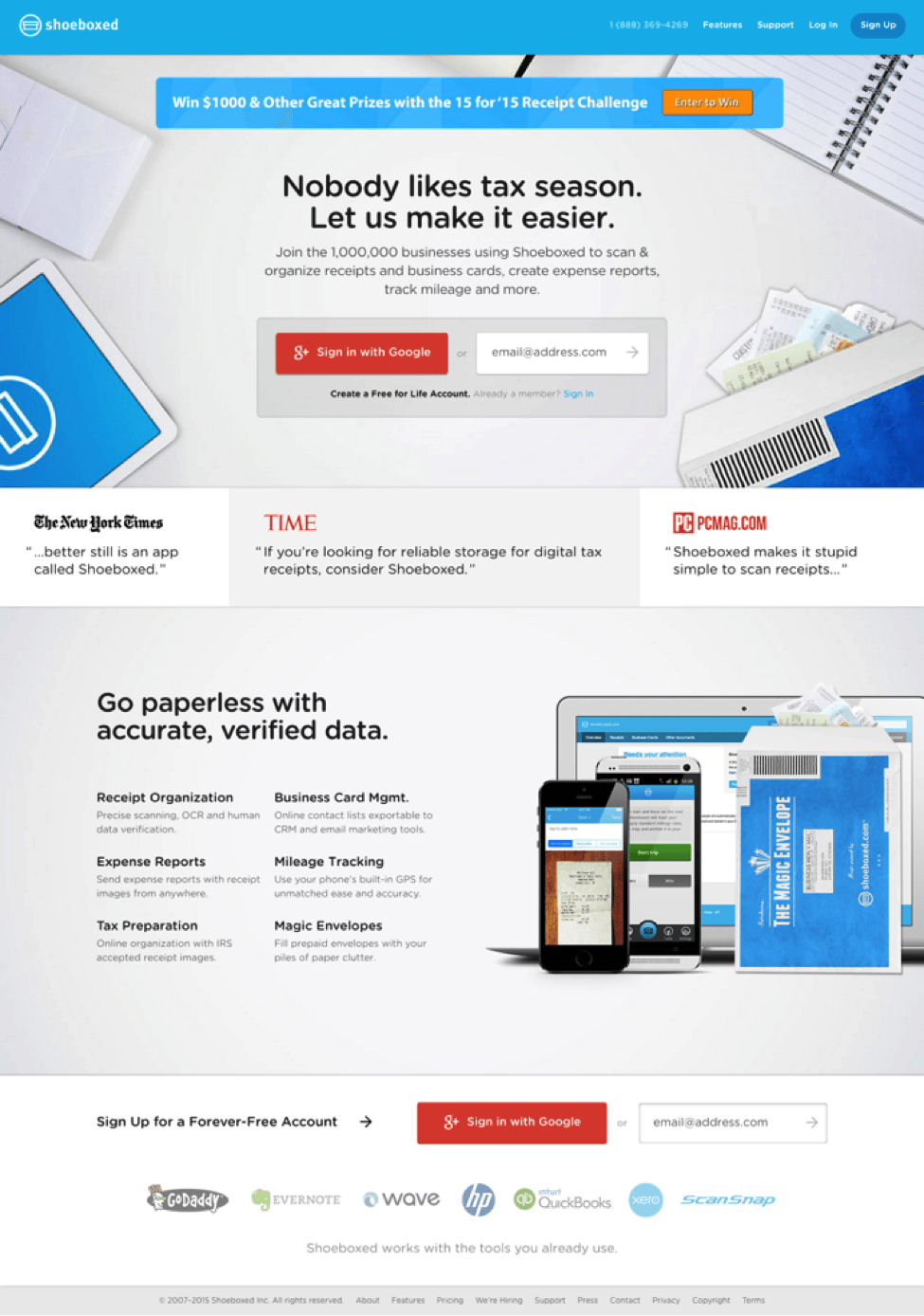
Take a look at the Shoeboxed landing page below. It has quite a few calls to action above the fold: “enter to win,” “sign up,” “sign in with Google +” and “enter your email.” The number of options a visitor has on one page is overwhelming.
The top part of a landing page should have only one call to action. By minimizing the number of initial requests you ask of visitors, you have a better chance of getting them to take a first step and initiate the process.
Five Simple Steps does a great job of helping their visitors take the first step by having just one call to action and structuring the page in such a way that all images and elements on the page point toward the CTA, so the visitor’s attention is immediately focused on it.

2. Avoid an Overload of Information

When it comes to your landing page, supplying information is important, but so is the location of the information. Though you may have many great advantages over your competitors, along with great features and a hundred reasons why a visitor should choose you, showering visitors with all those facts can be a major conversion killer.
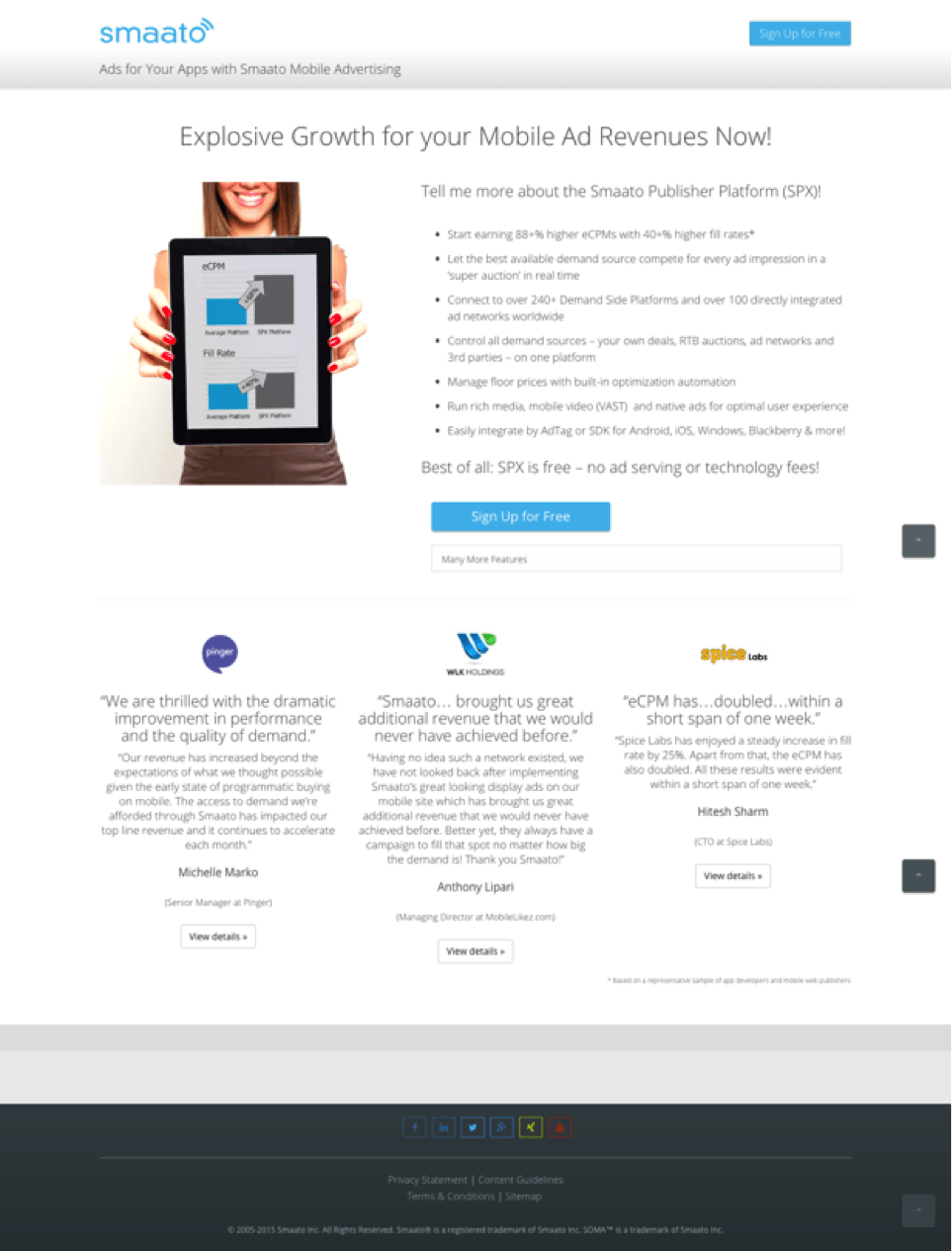
The landing page below is an example of one with a lot of text that is both hard to read and distracting.
This information could be easily optimized by either introducing it entirely below the fold or placing the most important bullets above the fold in a less distracting area. Then, visitors who require further information or who would like to learn more about the service/product could scroll to get the information.
While designing the landing page below we decided to place the most important information – a strong headline and subtitle, the call to action, and a few main bullets – above the fold. Additional information was placed below the fold. (The red line indicates the fold area.) Visitors who scroll below the fold can see information on how the platform works and additional features.

3. Lead the Way for Your Customers

Help visitors take the first step in your funnel and tell them what to do. When visitors arrive on your landing page, they need direction. Do not assume that people will just read all your content and know what they need to do next.
Note how AT&T’s landing page below has many elements on it, many colors, and various calls to action. From “submit” to “order now” and “call us today,” the amount of content on the page and the various offers can be extremely distracting and hard to take in.
Your landing page elements play a vital role in directing your visitors’ attention to a certain action. Use these elements to tell visitors what to do. For example, text isn’t enough; our brains process images 60,000 times quicker than they process text, meaning an image will be the first element noticed by visitors. So, if used properly, an image can trigger people into action.
Note how Charity Water uses the different elements of the page below very well:
  • The image of the girl looking at the call-to-action area directs visitor attention toward the button and shows people what to focus on.
  • The call-to-action button is used to focus people on one task only. Getting people to donate money online is a huge challenge, but by placing bullets and additional information below the fold, Charity Water directs visitors to focus on only one task.

4. Watch Your Visitors

One way to understand how people engage with your landing page and find out if it is successful in not confusing your visitors is to watch others engage with it. There are two main ways to do this:
  1. Actually watch people – Ask friends, colleagues, and family who have never seen your landing page to check it out. Don’t comment or explain the page to them. Watch intently and see what confuses them, what they find easy to do, and what their first natural reaction is to your page. Note the action they take when they first land on your page. These observations will allow you to see the positive emotions or frustrations of visitors.
  2. Use heatmaps – There are some great products and tools that can help you analyze visitor behavior. Using heatmaps, you can see what visitors are clicking on, where they start their experience, and what they actually do on your landing page. This data will help you immensely as you optimize your landing page.
An interesting case study on Crazy Egg demonstrated how using a heatmap (shown below) increased an ecommerce site’s conversion rates with less than 5 minutes’ work.
Examining their heatmap, this client noticed that visitors were not interested in the video they set up on their homepage. In fact, most people found it distracting and didn’t watch the video or click on the promoted links below the video. With a better understanding of visitor experience, the client moved the video to a different area on the homepage (a 5-minute fix) and immediately saw uplift in conversion rates.

Wrapping Up

There are many cognitive biases that impact the decision-making process. By identifying them and being aware of them, we can make our visitors’ decisions easier and quicker and, in turn, increase our revenue.

Tuesday, March 3, 2015

How to run a Facebook Contest or Facebook Sweepstakes


Wishpond has a full suite of Facebook Contest Apps. Learn how to run a Facebook contest here and try one out!

How to Run a Facebook Contest: Introduction

A Facebook Contest is an easy way to engage Facebook likes and convert them into email signups by enticing them with a prize. There are many different types of Facebook Contests from the most basic “random draw” Facebook Sweepstakes to highly involved video contests with a full panel of judges to decide a winner. Each has different benefits and may be more valuable depending on your type of business and campaign goals.
A Facebook Contest is a great way to achieve your goals in social media. One Facebook contest can give you the same return on investment as hundreds of pieces of content saving you time and effort. For small business owners and small marketing teams, this time-savings is invaluable. In this article you’ll learn how to run a Facebook Contest to achieve specific goals and expand your business to new audiences.
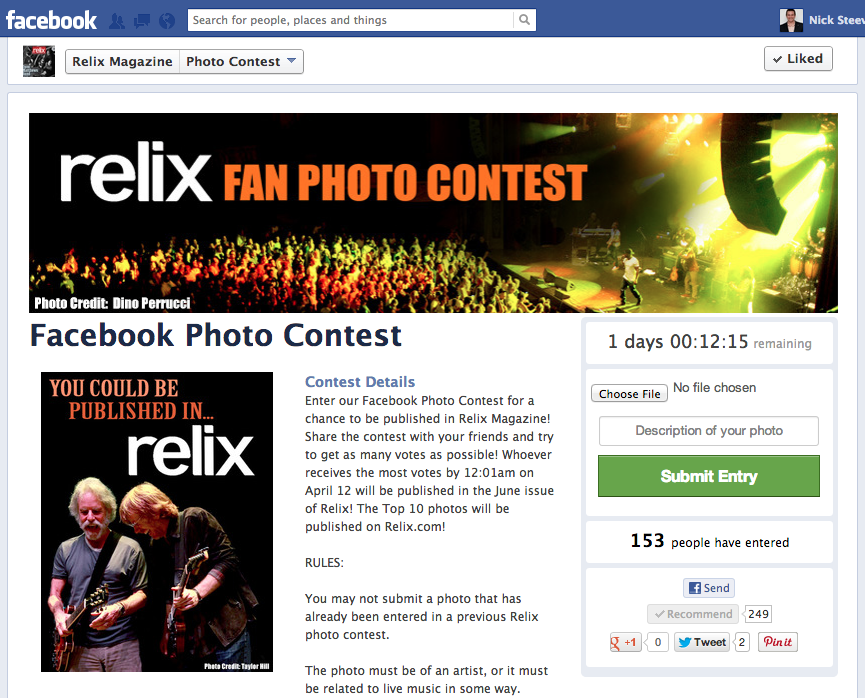
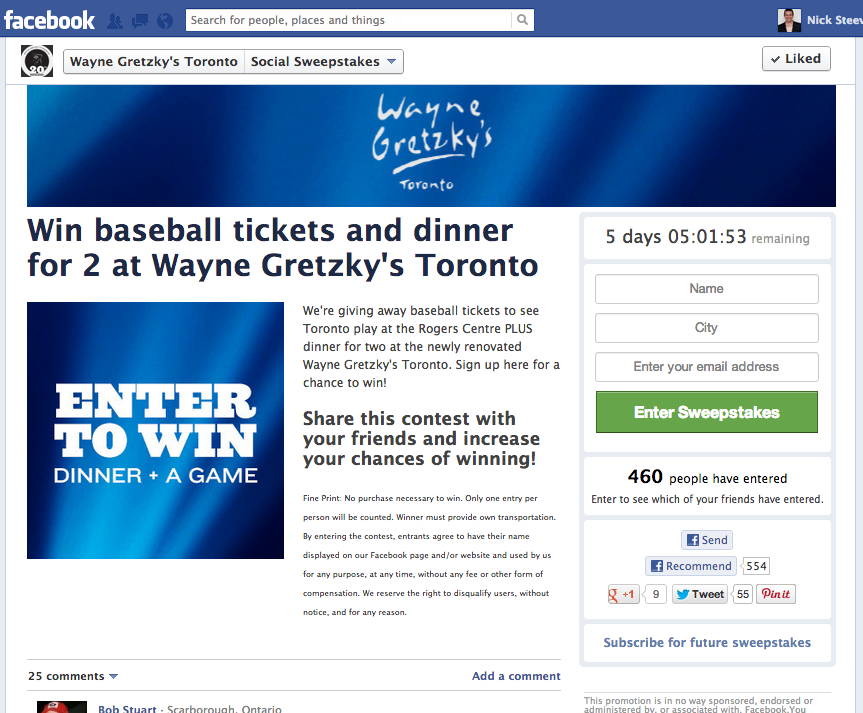
Check out a few Facebook contest examples before we jump in:

How to Run a Facebook Contest: 5-Step Guide

1. Choose a Prize and Entry Method

The prize is the most important piece of your contest puzzle as it’s what entices people to enter. It’s crucial that you make the prize relevant to your business, in order to encourage future purchases down the road.
A great prize idea for your contest is a gift card for your business. Why? There are two main reasons:
1. A gift card is enticing to all of your potential customers – it’s the prize that is the most enticing to the largest group of people. If you give away a certain product or service, you will only get entries from people interested in that specific product. With a gift card, you will attract entries from anyone who is interested in your business and all of the products you sell.
2. It will only attract people who are actually interested in your business. When it comes to contests, you shouldn’t always just be looking for the highest number of entries. For example, if you give away an ipad you will get a ton of entries, but those people will only be interested in ipads, not your products. This will make it almost impossible to convert these users into actual sales for your business. Giving away a gift card ensures that entrants have an interest in your products, making it easier to nurture them into paying customers.
Next, decide what users have to do to enter. Do they need to submit a photo? Or just enter their email address? What you ask for at the time of entry depends on your goals. See “5 Strategies for How to Run a Facebook Contest to Achieve Specific Goals” below for help in determining what to ask for. Here are 3 entry methods to consider:
1. Contact Details: This method requires people to enter their email address, name, phone number, etc. to enter. For this method you should ask for the smallest amount of data you need to be able to contact entrants with follow-up emails to convert them into sales.
2. Contact Details + User-generated content: This method allows you to ask users to enter photos, videos and text to enter. It provides you with great user-generated content to use in future marketing, and allows you to run contests in which users vote on their favorite entries to win.
3. Contact Details + Friend Referral: To boost entries you can require people to refer “X” number of friends to the contest for their entry to be valid. This is a great way to boost entries and sharing, expanding the awareness of your campaign.

2. Build your Contest Page

The contest entry page needs to be simple and exciting. It must get people excited about the contest and prize, and make it easy to enter. Here are the 5 elements of an entry page for a contest on Facebook:
1. Attention-Grabbing Title: A short title phrased as a call-to-action is the best way to maximize entries. For examples, “Enter to Win a $50 Gift Card from Diamond Candles!” is both simple and informative – it tells visitors what they can do on this page, what the prize is and who is running the contest. It contains the essential information a person needs to feel informed enough to enter the contest.
2. Graphic of Your Prize: An image of your prize is a great way to entice and motivate people to enter. If you’re giving away a gift card (recommended), include an image with the gift card value in text and a product that people can buy with that gift card.
3. Entry & Prizing Info: Include a short paragraph with info about the prize, how to enter and any rules or restrictions for your contest. You can easily add a link to an outside rules & restrictions page using our HTML Text Editor, to keep from overcrowding your contest page.
4. Entry Submission Form: An entry form for a Facebook contest consists of an email address signup box and an “Enter Sweepstakes” button. For contests that require entrants to submit photos, videos or text entries, it can include a file upload field or text area. It can also include custom fields like city, age, etc. to capture more personal details.
5. Share Buttons & Facebook Comments: Make it easy for entrants to share your contest with friends by including share buttons directly on the contest page. Wishpond’s Facebook Contest Apps include built-in Twitter, Facebook, Google+ and Pinterest share buttons. They also include Facebook Comments to boost interaction on the contest page.

3. Promote & Share your Contest

With your contest set up, it’s time to promote it. There will be organic growth from entrants sharing with friends, but you will need a few promotional boosts in the beginning to create the initial seed. Here are 5 methods to promote your contest:
1. Send an email blast: Email your customer email lists – they will be the most likely to enter and share with friends to help jump-start your contest.
2. Promote your contest on social networks: Share on Twitter, Pinterest, Google+ and anywhere else you have a social presence. This is a great way to introduce users from other networks to your Facebook Page and get them hooked more into your brand.
3. Add a banner on your website home page: If you’re an online business, you get the most traffic to your website, not your social network accounts. Capitalize on this traffic by including a banner on your homepage that links to your contest entry page.
4. Create a Facebook Ad:This is a great way to reach new customers outside of your current community. These ads can be very targeted to reach your demographic.
5. List your Contest on popular contesting websites: There are a ton of contesting websites that allow for free submissions. These are a great way to get access to new communities of customers. Check out our list of 19 websites to post your contest to.

4. Monitor your Contest

Depending on your contest goals, you may be interested in tracking entries, shares or new Fans. Here are 3 methods for monitoring metrics of your Facebook contest:
1. Facebook Page Insights: This tool allows you to track the number of shares, likes and comments your contest’s posts receive, and the number of new Fans your Page received during the run of your contest.
2. Google Alerts: Set up Google Alerts to monitor mentions of your contest across the entire web.
3. Wishpond Campaign Reporting: Wishpond’s Facebook Contest Apps include real-time campaign reporting, which allow you to track views, entries and bounce rates in real-time. This allows you to update your contest in real-time as it’s running.

5. Post-Contest Follow-up & Promotion

Even after your contest is over, you can use it to promote your Facebook Page further. Here are a few suggestions on how to leverage your contest and keep your entrants engaged with your business:
1. Profile winner(s) on your blog and share on Facebook and other social networks.
2. Create a video showing you choosing the winner to create excitement.
3. Send a follow-up email to contest entrants to convert them into sales.
4. Share your plans for future contests on Facebook to keep your followers hooked.
All of these activities keep the momentum going and will prime followers for future posts from your Facebook Page.

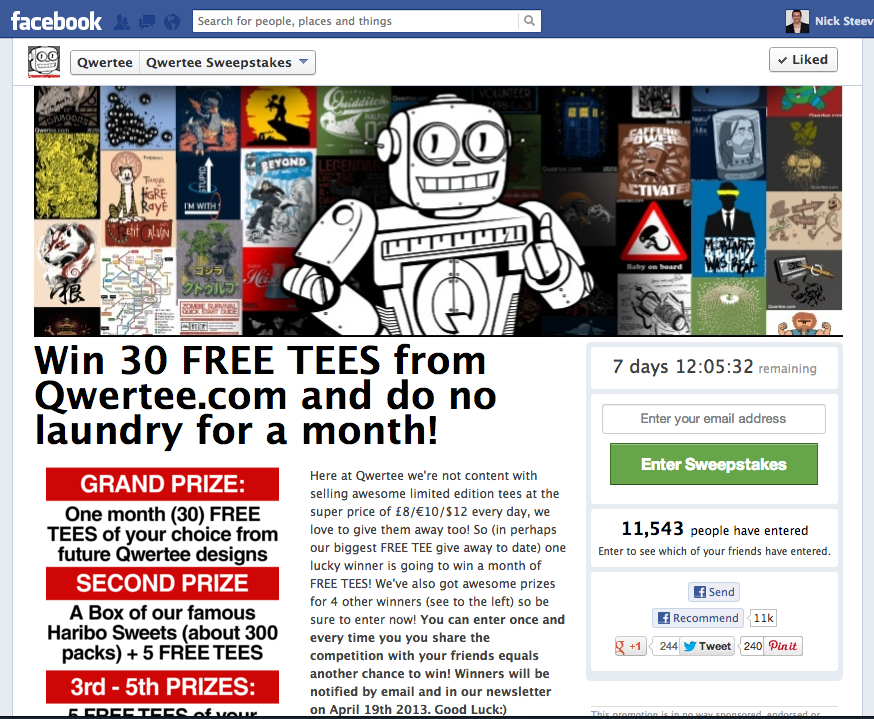
Pro Tip: Create a custom cover photo on your Facebook Page promoting your contest, with an arrow pointing down to the Page Tab to enter. See how Qwertee did this below:

How to run a Facebook Contest using a 3rd Party App (like Wishpond)

3rd party apps like Wishpond’s make it easy to create your Facebook Contest. Using our simple fill-in-the-blank campaign builder you can have your contest created in 5 minutes.  Facebook contest apps automate the set up, installation and data storage required for a contest.  Here are the steps you take inside the Wishpond campaign builder to create a Facebook contest:
1. Create your contest page by adding text, images and form fields to our contest template.
2. Install the contest app on your Facebook Page, Twitter account or website, where it will automatically appear when the contest goes live.
3. Once your contest begins, go to the Campaign Report Page to check out campaign stats including views, entries and conversion rate in real-time.

5 Strategies for How to run a Facebook Contest to Achieve Specific Goals

1. How to run a Facebook Contest to get New Emails and Leads

Every person who enters your Facebook contest gives you their email and contact details, making them a new lead to sell to. To maximize new emails and leads you need to maximize entries. You can do this by making the barrier to entry as low as possible. Do this by asking only for an email in order to enter. Minimizing your entry form to just one field will make it as fast and easy as possible to enter, maximizing your entry rate.

2. How to Run a Facebook Contest to Grow Brand Awareness

Brand awareness is earned exposure for your brand and products through the sharing by your fans. Brand awareness metrics include how many people were forwarded an email about your brand from their friends, how many people saw a shared message about your brand, and how many people see when their friend Likes your brand’s Facebook Page.  You can maximize brand awareness by having more people share about your contest. The more people who share, the more people will be exposed to a post about your contest, maximizing visibility for the contest and your brand.
You can boost sharing by stating that a prize will only be awarded when a certain number of people enter or share about the contest. This will push entrants to keep sharing more and more with their friends to reach the required number of entrants.

3. How to Run a Facebook Contest to Get New Fans

Getting new Fans for your Facebook Page is much easier with a Facebook Like Popup embedded on your contest page. A “like” popup is our solution to the recent extinction of like-gating. It involves a simple popup appearing on page when a user arrives at the contest tab of your Facebook Page. The popup politely asks users to “like” your page so that they can stay connected in the future. It’s no longer a requirement of entering the contest, but if users are genuinely interested in your brand it will be an easy decision to say yes.
The popup is just one more way to grab those who are already interested in you at the right moment. A perfect example of a “Like” popup can be seen below from Adventure Canada.

4. How to Run a Facebook Contest to Get User Generated Content

User generated content includes photo, videos and written recommendations by fans that mention your brand or products. It can be great content to use in your marketing as it gives social proof about the benefits of your products and standing of your brand.
Written recommendations are the easiest type of user generated content to obtain from fans. By including a simple text area in your contest’s entry form, you make it easy for anybody to write in their content directly. Ask fans to write about how they use their products or why they like your products using an Essay Contest App to get great recommendations for your products and brand.
Photos are a bit harder to obtain than written content, but with smartphones it’s easy for any person to take a photo and immediately submit it to enter your contest. The best types of photos include your brand or products – as these can be used in your marketing to show proof of customers using – and loving! – your products and brand.
Check out our article 7 Facebook Photo Contest Examples to see how businesses have run photos contests using Wishpond’s Photo Contest App.
Videos are the hardest type of content for people to create, as they take a long time and may involve writing a script and getting help from their friends. These are excellent pieces of content to have though, especially if they include testimonials, which can be included on your website to show full proof of your brand’s happy customers.
Pro Tip: By including built-in sharing features, you can boost the reach of the content by having the entrants share with friends.

5. How to Run a Facebook Contest to Keep Fans Engaged

Fan engagement is important to keep in mind as it shows how much your fans are thinking and talking about your brand. The more engaged they are, the more likely they are to purchase from you in the future. A regular schedule of monthly or bi-weekly contests is an easy way to keep fans engaged and coming back to your Facebook Page and website to see what’s happening.
These contests don’t require large prizes. Something small like a $25 gift card is a big enough prize to keep fans engaged and coming back for more. Wishpond client Diamond Candles has used this strategy to grow their Facebook fanbase to over 260,000 fans. Learn more about how they’ve used Facebook contests to their success in our Diamond Candles Case Study.